http://www.tagxedo.com/
7.15.2011
Tagxedo.com
I found the following website during my Summer vacation. I plan to use it in my computer class :)
![]()
http://www.tagxedo.com/
http://www.tagxedo.com/


I learned about a cool website called "The Stock Market Game" while watching PBS Biz Kids.
I look forward to using this awesome program with my upper elementary and junior high students!
"Welcome to the Iowa Stock Market Game™ Program - Celebrating Over 30 Years!
The Stock Market Game program has worked for over nine million students by appealing to their desire to gain financial independence and experience a little competition. It`s very easy to implement, reaches across the entire curriculum, and is fun to teach.
The Stock Market Game ™ program transports students into real world investing while learning academic concepts that relate to their entire core curriculum. Students (grades 4-12) buy into the entire process through active involvement. Students work in teams practicing leadership, organization, negotiation, and cooperation. As they work to grow their $100,000 virtual cash accounts into a top-performing portfolio, they develop strong interests in the daily events that shape our world and barely realize how much math, business, economics, language arts and social studies they’re learning. Students compete against their classmates as well as other schools so kids see the program as "fun."
No prior knowledge of the stock market is needed! The Stock Market Game program provides lesson plans that teachers weave into their existing plans, giving difficult concepts an easy-to-understand, real-life spin. For only an hour or so a week, or however long teachers choose, students retain more. On-line training materials are provided and teacher-training workshops are available.
Thanks to a generous grant from the SIFMA Foundation for Investor Education, the program is offered at no cost! Simply skip the billing information section on the registration page!"
5.23.2011
5.21.2011
Charity Recipient of our Coin Donation- 5th & 6th Grade
The Fifth and Sixth Graders voted on a charity to be the recipient of our coin donation. Ronald McDonald House of Iowa City will be the charity that will recieve the $95 from Mrs. Miller's large stash of coins. The Fifth/Sixth Graders chose this charity because three of our ZSJ students have stayed at the house during their medical appointments at the University of Iowa Hospital. I was very delighted with the student's choice!
I would like to make it an annual tradition at our school to hold a coin drive and donation that is 100% directed by the ZSJ students!
Updated: The Ronald McDonald House of Iowa City is running a great contest for participating elementary schools called "Pull Tabs". Take a look!
I would like to make it an annual tradition at our school to hold a coin drive and donation that is 100% directed by the ZSJ students!
Updated: The Ronald McDonald House of Iowa City is running a great contest for participating elementary schools called "Pull Tabs". Take a look!
5.18.2011
Google Search and Christian Movie- 3rd-5th Grade
The Third through Fifth Graders are working on a Christian movie using Windows Movie Maker. The first task was to search for Christian images to be used in the movie. The kids used Google as their search engine. We learned quickly that typing in generic key words such as "Jesus" and "God" was not the best way to search for good pictures. We found many disrespectful pictures geared at mocking Christianity. I challanged the students to think of other key words for good search results. After giving the example "Triune God" and "The Good Shepherd," the kids started coming up with some great ideas. Some of the key words the kids thought of were Worthy is the Lamb, The Lord is my Savior, Father Son and Holy Spirit, Holy Trinity, God my Father, I shall not want, etc.
Once the students collect at least 20 images in their pictures folder, they will begin to work on their movie. This project will be their final project of this school year.
Once the students collect at least 20 images in their pictures folder, they will begin to work on their movie. This project will be their final project of this school year.
5.17.2011
Favorite Seasons- 2nd Grade
The Second Graders made suggestions for projects to go along with their Science theme, seasons. The students suggested creating a fact sheet using word, a slide show using PowerPoint and a graph using Excel. The kids voted, and the graph with Excel project won the majority!
The students rated each season, one being their least favorite and four being their favorite. I recorded all of the data, and the students worked together to add the numbers. The students typed the total data into the spreadsheet. Then, they showed me how to create a pie chart using the data. I was delighted to see that everyone was able to create a chart!
The kids formatted the chart color and font style, and they added a title. Then, they saved their work to the server. Good job Second Grade!



The students rated each season, one being their least favorite and four being their favorite. I recorded all of the data, and the students worked together to add the numbers. The students typed the total data into the spreadsheet. Then, they showed me how to create a pie chart using the data. I was delighted to see that everyone was able to create a chart!
The kids formatted the chart color and font style, and they added a title. Then, they saved their work to the server. Good job Second Grade!


5.10.2011
Class Cookbook- 5th & 6th Grade
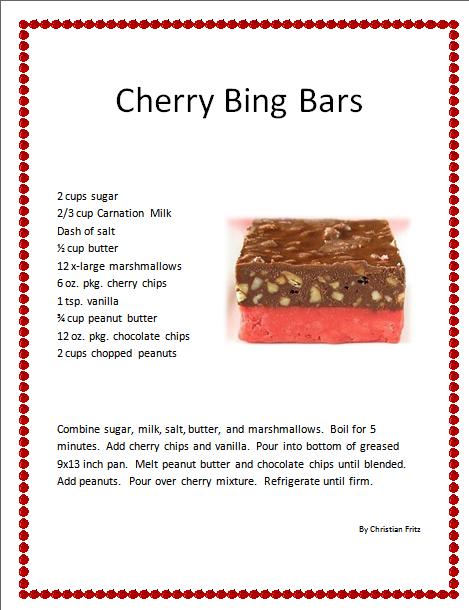
The Fifth and Sixth Graders have been working on a class cookbook since the beginning of the school year. Each student published their favorite recipe on Word, and they shared the prepared recipe with their class. Last week they created a title page. This week, I printed off 16 copies of each recipe and lamenated the title pages. The books will be spiral bound, and the students will have a keep-sake cookbook! Check out some of the recipes! The kids put a lot of work and time into their work:




5.02.2011
Graphing Coins on Excel- 2nd-6th Grade
I was inspired by a coin collection that a student shared with me last week. I wanted to help him find some of the coins that he needed to add to his collection. Knowing that I had a huge collection of coins in my house that had been sitting around for at least the last decade, I thought I could find some of the coins he was looking for.
This small idea turned into a very exciting idea for Monday's computer class project. In the end, I decided to have the kids make a "guess-estimate" of the total money that was in my coin collection. The students recorded their guesses on the Excel spreadsheet. Next, the students typed labels (pennies, nickles, dimes, and quarters) into the cells of the A column. Then, they each took a handful of coins, and they sorted the coins into groups, counted how many coins were in each group, and recorded their data into the appropriate cells in the B column. They used the "auto sum" tool to add up the total number of coins that they had in their handful. I recorded their data into my own spreadsheet. I showed the kids how to use formulas (ex: =B4*5 for nickels) to find the value of each group. I also showed the kids how to divide the total amount by 100 to convert the total number of cents into dollars and cents.
The best part of this project is that the students will research different charities, and they will vote on one charity to be a recipient of the grand total as a donation! The grand total was $98.12!

This small idea turned into a very exciting idea for Monday's computer class project. In the end, I decided to have the kids make a "guess-estimate" of the total money that was in my coin collection. The students recorded their guesses on the Excel spreadsheet. Next, the students typed labels (pennies, nickles, dimes, and quarters) into the cells of the A column. Then, they each took a handful of coins, and they sorted the coins into groups, counted how many coins were in each group, and recorded their data into the appropriate cells in the B column. They used the "auto sum" tool to add up the total number of coins that they had in their handful. I recorded their data into my own spreadsheet. I showed the kids how to use formulas (ex: =B4*5 for nickels) to find the value of each group. I also showed the kids how to divide the total amount by 100 to convert the total number of cents into dollars and cents.
The best part of this project is that the students will research different charities, and they will vote on one charity to be a recipient of the grand total as a donation! The grand total was $98.12!

4.28.2011


4.08.2011


4.07.2011
Choosing Websites- 2nd Grade
The Second Graders used Google web search to find websites about their insect. They skimmed through the suggested sites, and they decided on the best site for them. The students visited each workstation to evaluate the websites; the attributes they evaluated included size of font, vocabulary, length of sentences, organization of information, subtitles and page layout. The students all agreed that sites with a large font, short and straight-to-the-point sentences, lots of pictures and simple subtitles were the easiest to understand. The kid's favorite website was http://www.pestworldforkids.org/index.html.

4.05.2011
Mock Church Budget Spreadsheet on Excel- 3rd-6th Grade
The Third-Sixth Graders are working on a mock church budget spreadsheet on MS Excel. They are using various tools such as merge & center, text color, auto-sum and auto difference, and general cell formatting. We reviewed some budget vocabulary words including income, salary, expense, consumables, utilities, donations, offerings, misc. and savings.


4.04.2011
Insect Fact Sheet- 2nd Grade
 The Second Graders are working on a fact sheet about an insect of their choice. The students chose to research termites, ladybugs, bumble bees, praying mantis, wasps, butterflies and Asian hornets. The topics they'll include in the fact sheets are appearance, habitat, diet, methods of self defense and life cycle. The students will be reviewing skills such as inserting and formatting an image, inserting and formatting bullets, using spell check, and using a search engine for research.
Here are some cool sites about insects:

4.01.2011
Operetta Flyer- 5th/6th Grade
The Fifth and Sixth Graders are using Publisher to create a flyer for the 2011 operetta. Follow the link below for the information that they'll include.
http://zsjfalcons.edu.glogster.com/zsj-operetta-2011/
http://zsjfalcons.edu.glogster.com/zsj-operetta-2011/
3.31.2011
Inventions of Yesteryear Collage- 3rd/4th Grade
The Third/Fourth Graders are working on a collage using Paint. They're googling images of various inventions of yesteryear (the first car, computer, camera, etc) and inserting the images into Paint.


3.28.2011
Publisher Creation- 5th & 6th Grade
The Fifth and Sixth Graders will be using MS Publisher to create a document of their choice to accompany their glog subject. They have the choice to create a flyer, business card, brochure or post card. One student's glog subject was about being a chef; his Publisher creation could be a menu for his restaurant. Another student's glog subject was about being a fashion designer; her Publisher creation could be a buisness card.
Collage of Endangered Species- 2nd Grade
The Second Graders are working on a collage of endangered species using Paint. This project requires the students to use a search engine to find images on the Internet and to use the edit toolbar on the Paint application. Stay tuned for their completed pieces of art!

In the meantime, check out Shape Collage. It's free. It's cool. It's easy. It has educational potential! I plan to download the application on each student computer.

In the meantime, check out Shape Collage. It's free. It's cool. It's easy. It has educational potential! I plan to download the application on each student computer.
Subscribe to:
Posts (Atom)